
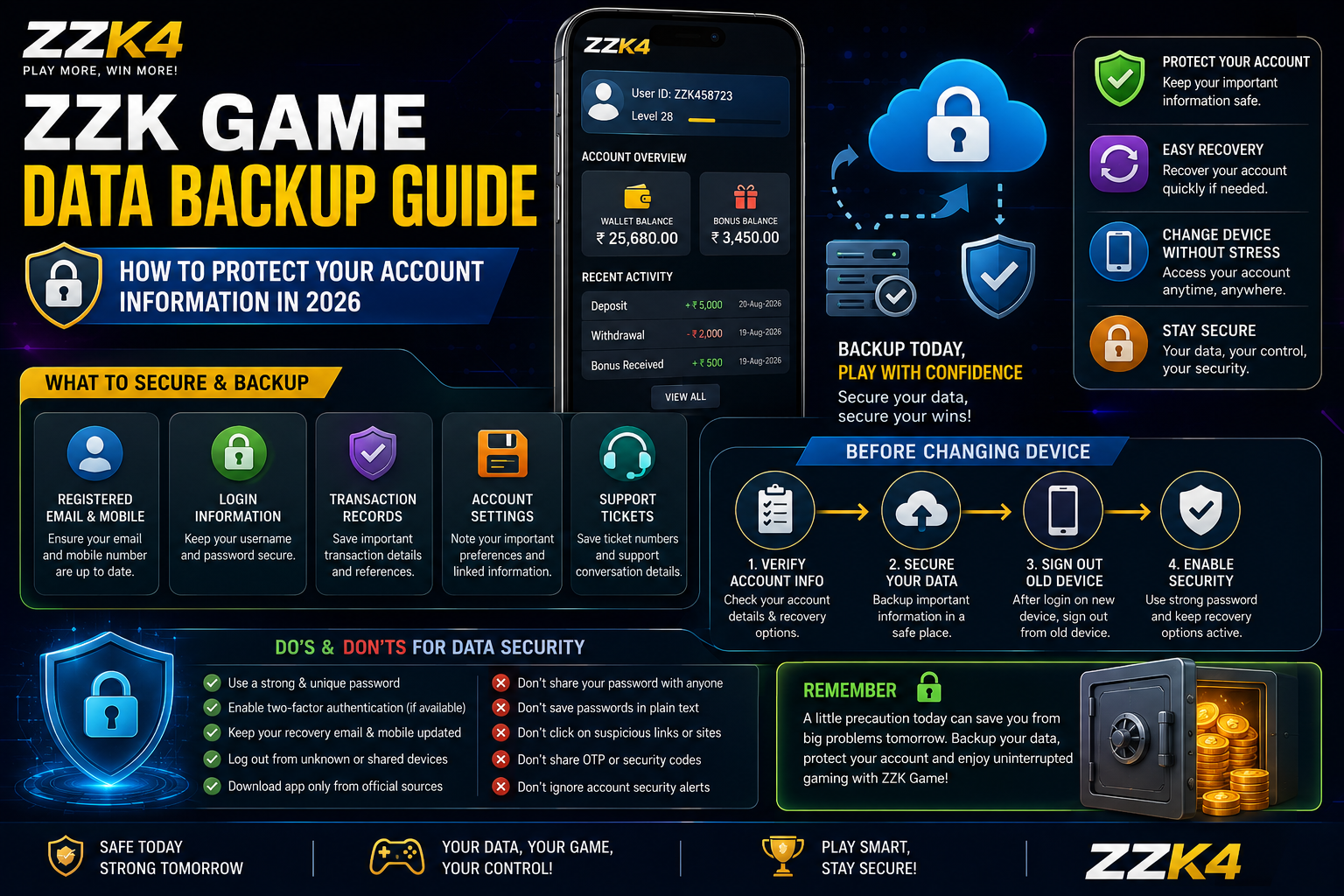
Keeping important account information organized can make it easier to recover access and troubleshoot problems when using ZZK Game. While many users focus on installation, updates and notifications, it is also useful to understand how account-related information can be protected.
This ZZK Game data backup guide explains practical ways to protect important information, prepare for device changes and avoid losing access to useful account details in 2026.
What Is ZZK Game Data Backup?
A data backup is a copy or record of important information that you may need later.
Depending on the features available on ZZK Game, relevant information can include account details, login information, transaction records, settings and other user-specific data.
Not every type of platform data can be manually backed up. Some information may be stored on the platform’s servers rather than directly on your device.
Why Is Data Backup Important?
A backup or secure record can be useful when:
- You change your smartphone.
- You reset your device.
- You reinstall an application.
- You lose access to a device.
- You need to review previous account information.
- You experience an unexpected technical problem.
Keeping important information protected can reduce unnecessary problems during these situations.
What ZZK Game Information Should You Keep Secure?
You should avoid creating unnecessary copies of sensitive information. Instead, focus on information that may genuinely help with account recovery or troubleshooting.
Useful records may include:
- Registered email address
- Registered mobile number
- Username
- Account recovery information
- Important transaction references
- Support request details
- Device information when troubleshooting
Never store passwords in plain text or share them with another person.
How to Prepare Before Changing Your Device
If you are moving from one smartphone to another, prepare your account information first.
Step 1: Check Your Account Details
Open your account settings and verify that your registered contact information is correct.
Step 2: Secure Your Login Information
Make sure you know the correct login method before moving to another device.
Use a strong, unique password and avoid saving it in unsecured notes or documents.
Step 3: Review Important Records
If you need previous transaction or account information later, review the available history and keep only necessary references in a secure location.
Step 4: Check Your Recovery Options
Make sure any available account recovery method is accessible before you stop using your old device.
Step 5: Sign Out From the Old Device
After successfully accessing your account on the new device, sign out from the old device when appropriate.
How to Protect ZZK Game Login Information
Your login credentials should be treated as private information.
Follow these security practices:
- Use a unique password.
- Never share your password.
- Avoid using the same password across multiple websites.
- Use a reputable password manager if needed.
- Do not send passwords through chat or social media.
- Avoid entering credentials on suspicious pages.
- Check the website address before logging in.
If the platform provides additional security options, enable them when appropriate.
Can ZZK Game Data Be Backed Up Manually?
This depends on the type of information and the features provided by the platform.
Some information may be stored online and linked to your account rather than stored locally on your phone. In that situation, reinstalling the application may not require manually copying the data.
However, locally stored settings or device-specific information may behave differently.
Always check the current platform instructions before deleting application data or resetting your device.
What to Do Before Reinstalling ZZK Game
If you plan to reinstall the application, take a few precautions first:
- Confirm that you know your login details.
- Check your registered contact information.
- Review important account records.
- Confirm available recovery options.
- Remove unnecessary temporary files.
- Reinstall only from a trusted source.
- Log in again after installation.
- Verify that your account information is available.
Do not delete application data simply to solve a minor problem unless you understand what the action will remove.
Protecting Transaction Information
If your account includes transaction history, review it regularly.
For important transactions, keep relevant reference numbers or confirmation details in a secure location.
Avoid storing complete payment information unnecessarily.
Never publish transaction screenshots containing:
- Account numbers
- Card details
- OTPs
- Passwords
- Private contact information
- Security codes
If you need to contact support, provide only the information they legitimately require.
What Happens After Changing Phones?
Changing phones does not necessarily mean that your online account is lost.
If account information is stored online, you may be able to access it again after signing in on the new device.
The process can vary depending on the platform’s current account system.
Before changing devices, make sure you have access to the registered recovery method.
Common Data Backup Problems
I Forgot My Login Details
Use the platform’s official account recovery process if one is available.
Avoid using unofficial services that claim they can recover your account.
My Previous Information Is Missing
Check whether the information was stored locally or connected to your online account.
If necessary, contact official support with relevant account details.
I Reset My Phone
After resetting a device, reinstall applications only from trusted sources and sign in using the correct account credentials.
I Cannot Access My Recovery Method
Contact the appropriate official support channel and explain the problem. Do not give your password or one-time security codes to anyone claiming to provide assistance.
How to Keep Your Account Information Organized
You do not need to save every piece of information.
A simple system can include:
- A secure password manager for passwords
- A private record of important account identifiers
- Transaction references when required
- Support ticket numbers
- Recovery information
Keep these records protected and review them occasionally.
Data Backup and Privacy
Backing up information should not mean collecting unnecessary personal data.
Only keep information that serves a useful purpose.
Before storing a screenshot, document or exported file, check whether it contains sensitive information. Remove unnecessary personal or payment details whenever possible.
ZZK Game Data Backup Checklist
Before changing devices or reinstalling the application, check the following:
- Confirm your account details.
- Verify your recovery method.
- Secure your login credentials.
- Review important account records.
- Save necessary transaction references.
- Avoid storing passwords in plain text.
- Use trusted storage for sensitive information.
- Install applications from trusted sources.
- Sign out from devices you no longer use.
- Contact official support if account access becomes difficult.
Frequently Asked Questions
What is a ZZK Game data backup?
A ZZK Game data backup refers to securely preserving important account-related information that may be needed when changing devices, reinstalling the application or troubleshooting an account.
Should I save my ZZK Game password in a document?
No. Passwords should not be stored in ordinary documents or unsecured notes. A reputable password manager is a safer option.
Will reinstalling ZZK Game delete my account?
Reinstallation and account deletion are different actions. Whether information remains available depends on how the platform stores and synchronizes account data.
What should I save before changing my phone?
Confirm your login method, recovery information and any important account or transaction references before moving to the new device.
Is it safe to share account screenshots?
Avoid sharing screenshots that contain passwords, OTPs, payment information, security codes or other sensitive details.
Final Thoughts
A simple ZZK Game data backup routine can help you prepare for device changes, application reinstallation and unexpected access problems. Focus on protecting essential account information rather than creating unnecessary copies of personal data.
Use strong login security, protect recovery information and rely on official support channels whenever you need account assistance. Most importantly, never share passwords, OTPs or security codes with other people.